| DateMan | Price: $54.95 |
|
DateMan presents your schedule in a clean, uncluttered fashion, and gives you the
greatest amount of information in the least amount of time. It's Main Agenda View
lists every item on your schedule, over any length of time. It lets you precisely plan
your upcoming events, and always know what's around the corner.
DateMan is also easy to customize. DateMan works around you, rather than you having to adjust to it. To this end, we've made it possible to configure just about every aspect of the application. If you don't like the way a feature works, chances are that you can change it to suit your needs. DateMan 3.1 brings a modular design to DateMan, so you only need to install the packages that you use. This keeps Dateman's size and complexity to a minimum, making it easy to use. Because the aspects of your life are connected, DateMan links information together. This could be linking Appointment invitees to the Appointment, or linking a group of people to a list of tasks. Once an item has been linked, it is quick and easy to jump from it to its application, and back again. The items stay linked whether you're in DateMan, the NotePad, or the Names application. We've placed DateMan buttons in several of the built in applications (Names, NotePad, and Dates) to allow you quick access to many of DateMan's functions, without having to stop whatever else you're doing. |
|
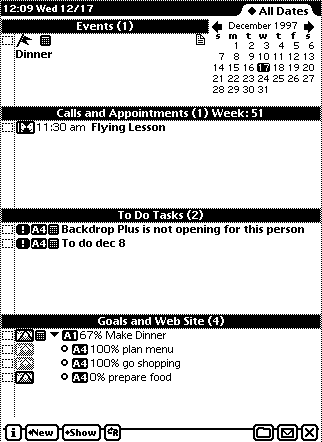
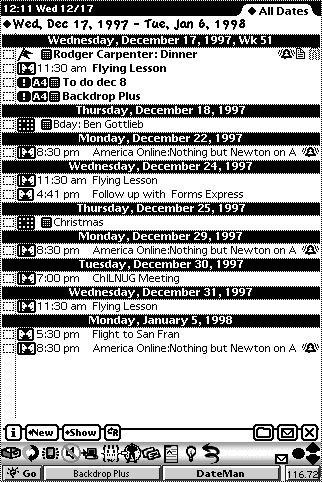
| DateMan's main screen displays all of your information over a selected period of time. |
|
| DateMan also has a view that just displays your information for a single day. In the day view, you can have up to four windows to separate your information. |
|
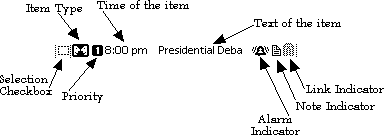
| No matter what view you're in, each item is set up to give you your information in a single glance. | |
|
|
| Tapping on the item type will popup a list of available actions. These include printing, faxing, or beaming the item; linking the item to another item; placing the call (if it's a call item); Marking the item as done or undone; adding notes to the item; and deleting or duplicating the item. Tapping and holding on this item will mark the item done if it is undone, or undone if it is done. | |
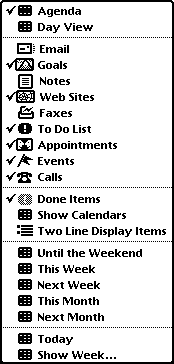
| DateMan 3.1 also includes several special types of items. You now can include Email, Web sites, Faxes, and Goals; as well as Notes, Calls, Appointments, Events, and To Do Tasks. |
|
| The DateMan Comparison page shows the advantages of using DateMan over other PIMs (Personal Information Mangers). We also offer a competitive upgrade to DateMan from any other PIM. | |
| Download for Newton 2.0 Compatible Devices | ||||
|---|---|---|---|---|
|
|
|
|
|
|
NewtonOS |
PalmOS |
NewtonOS Betas |
PalmOS Betas News | eMate | Support | About SAI | Ordering
Copyright © 1998 Stand Alone, Inc., All Rights Reserved. |